Once I had dozens of Hyper-key shortcuts (see Hyperkey), I couldn't remember them all, or tell which keys were still free. So I built Hyper Keys, a small native Mac app written in Swift. Press Hyper+/ from any app and a cheat sheet opens on top of it, without taking focus away from what I was doing. Press it again and it's gone.
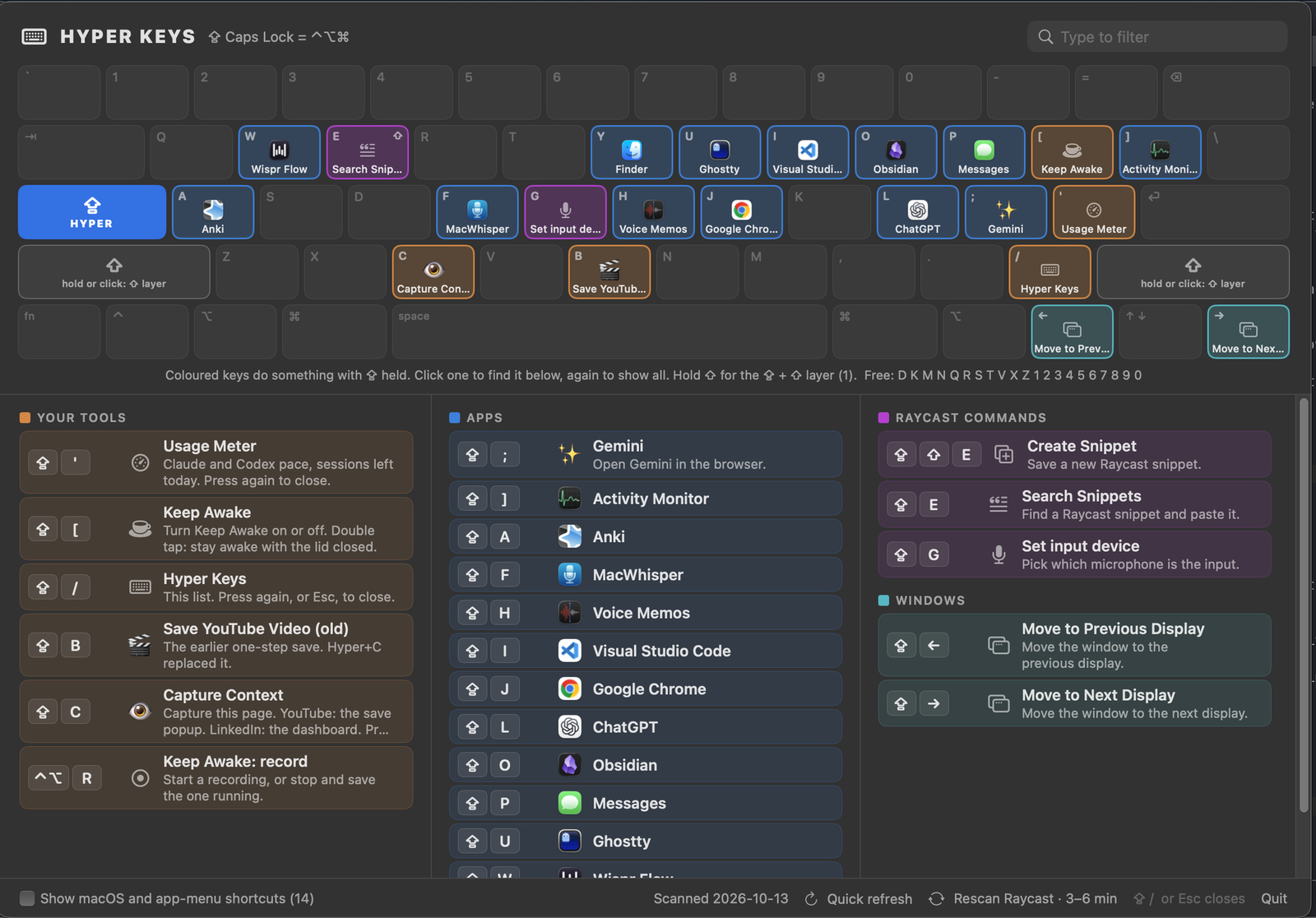
The top of the sheet draws my keyboard. Every key that does something shows its app's icon and is colored by group: my own tools, apps, Raycast commands, and window controls. Free keys are dimmed. Holding Shift switches to the second layer of shortcuts. Typing filters the list, and a warning marks any key that two things are fighting over.
Nobody types the list in by hand. An audit script collects shortcuts from Karabiner, macOS, Obsidian, my own apps and Raycast. Raycast keeps its hotkeys in an encrypted database, so the script reads them off Raycast's Settings window through macOS Accessibility, without touching the keyboard or mouse. Two buttons on the sheet rescan after I change a shortcut.